
A common use of AI programs like ChatGPT, Claude or Gemini is querying files like PDFs. AI can provide in-depth analysis and insights when the PDF files are simple. However, when the PDF has a lot of images and tables the AI systems available today aren’t good. They often struggle with complex documents that include a lot of images and tables.
Fortunately, LlamaIndex released an incredibly useful and free tool to parse or break the PDF into manageable pieces that AI systems can more easily understand.
In this post I’ll discuss what the tool is, how to use it for people with and without coding experience and how it improves the performance of current AI models.
LlamaIndex and Parse
LlamaIndex is an open-source framework that focuses on being the bridge between custom knowledge sources and generative AI. LlamaIndex basically gives people the tools to use AI for tasks it wasn’t specifically trained on. For example, ChatGPT has a knowledge date cutoff but with LlamaIndex users can pass any information to ChatGPT to ask it questions about current events.
LlamaIndex has tools for Retrieving Augmented Generation (RAG), agents (AI that can complete tasks) and now PDF parsing or LlamaParse.
LlamaParse is really cool because it takes a complex PDF with tables, formatting, etc. and breaks it down into a simple text format or markdown. This process makes the PDF much easier for the AI to understand or digest.
How to use LlamaParse
There are several ways to use LlamaParse. The first being directly through Python. Running it in Python just takes a few lines of code. The first step is to get an API key from https://cloud.llamaindex.ai/. Then it is as simple as copying the code below and running it in a Jupyter Notebook.
For a more detailed explanation I highly recommend checking out their cookbook on GitHub: LlamaParse Cookbook.

The second and simpler method is outlined below. This method doesn’t require coding and is simpler for contractors, architects and engineers to leverage this exceptional tool.
The first step is to signup for Llama Cloud account at https://cloud.llamaindex.ai. Once you signup you’ll have access to the parse tool. Currently, it’s free to signup and LlamaIndex gives users to ability to parse 1,000 pages/day. Select Parse on the first screen after logging in.
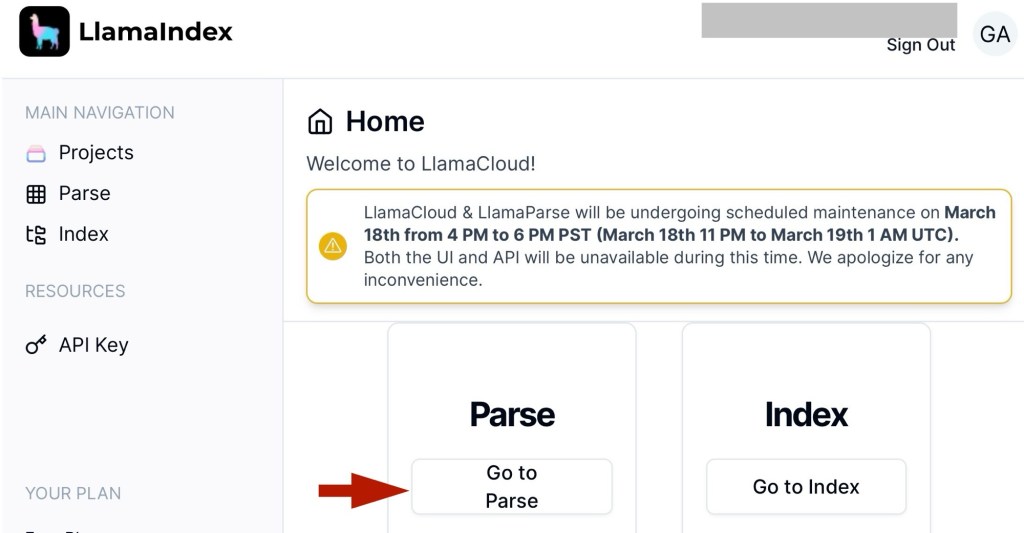
The parse page gives simple examples of how to use the parse tool through an API call and there is also a preview window that allows users to upload a PDF. If you upload a PDF the preview tool will automatically parse it and Voila you have a simplified text version of the PDF. Simply copy and paste the text into your favorite editor (I use notepad) then upload to your favorite AI.


Comparison of AI with and without LlamaParse
I’ll evaluate the performance of three AI tools (Claude Opus, GPT-4 and Gemini Pro) against a complex PDF without and with LlamaParse. The PDF I’ll be using is the “2024 Five Year Building Program Report” from the State of Utah Division of Facilities Construction and Management (DFCM). The DFCM is an incredibly transparent organization that shares all its spending with Utah Legislature. This report covers state funded construction and facility maintenance. There is a tremendous amount of information in the report such as a high-resolution on building costs including breakouts for construction, design, interior for out etc. The report also outlines how much money the state spends on leases. This report provides insightful for architects, engineers, contractors and real estate agents who work with the DFCM. However, it’s 154 pages long and extracting relevant information takes a long time. This is where AI can shine because with a few steps it’s possible to ask any question and get a prompt response.
OpenAI GPT-4 performance
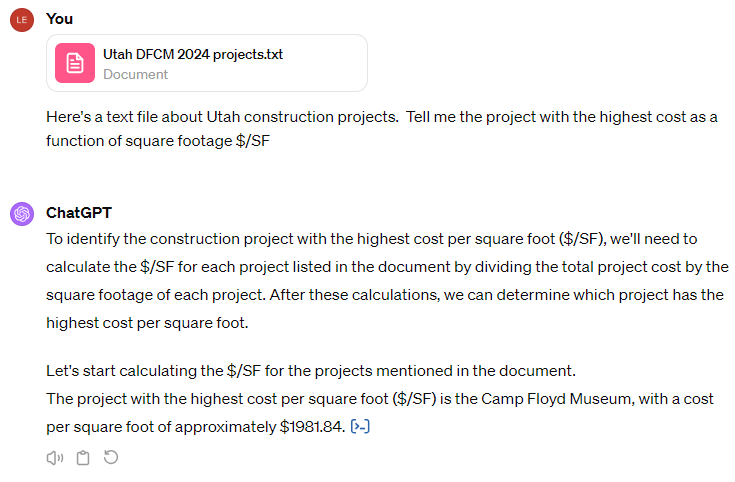
OpenAI was first to launch so I’ll try it first. The image below shows GPT-4 response based on the PDF. The response looks definitive and at first glance it looks correct but in reality there are four projects with higher $/SF costs!

Now let’s try uploading the parsed PDF and see what happens. Viola! GPT-4 got the right answer. This shows that a parsed PDF improves reliability in the responses.
Anthropic – Claude Opus Performance
Anthropic’s newest model, Claude Opus, was just released a few weeks ago. Many claim that it rivals GPT-4 in intelligence. The first impression I got is that is has limitations in the file upload size. So right off the bat, Claude Opus doesn’t do great with the unmodified PDF.

An additional benefit of using Llama Parse is that the parsed PDF is much smaller. The PDF in this demo is 18,643-KB and the parsed text file is only 210-kB. This is a big reduction and meets the Claude-Opus file limit size. The first response was technically correct because the highest lease space type is $32.18 / SF. However, once I rephrased the question to be more precise Opus provided the wrong answer.

Google – Gemini Pro Performance
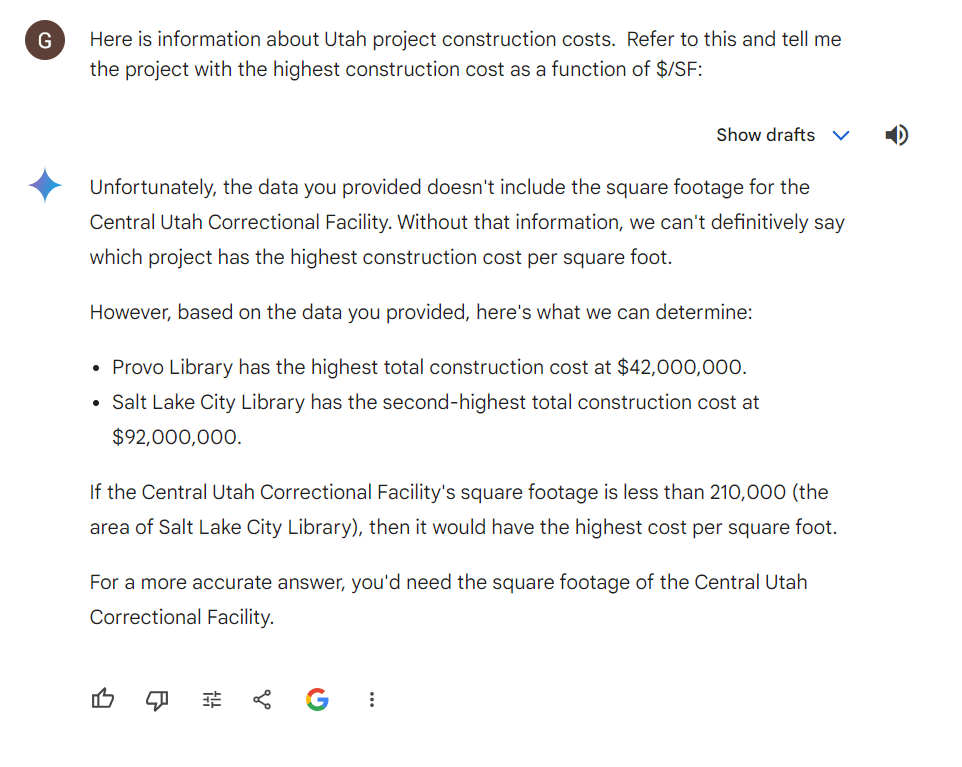
Gemini is supposably a top performing AI but it doesn’t include the functionality of uploading a PDF. It is possible to paste text into the prompt though. When I pasted the parsed PDF text into the chat the response was incorrect. Gemini didn’t fully read the information and hallucinated that the square footage wasn’t in the dataset.
Conclusion
In this post I’ve covered what Llama Parse is, how to use it and demonstrated an approach to get better responses from AI tools. Across the the three AI tools GPT-4 provided the correct answer but only with the parsed file. Claude Opus wasn’t able to access the original PDF because it was to large and the responses for the parsed PDF weren’t as good. Finally, the response from Gemini was just all around bad. In summary, Llama Parse improves AI performance and reduces file size.
I hope that you find LlamaParse as helpful as I have. If you want to discover more ways to integrate AI into your company please reach out. You can also check out my other blog posts for more tips.


 L&L Engineering
Leave a comment