
If you run a business that relies on physical materials—like construction, manufacturing, or retail—you know the pain of the “Invoice Shuffle.”
It usually looks like this: You receive an invoice from a supplier. Someone has to open it, read it, manually type the data into a spreadsheet (or worse, just file it away), and hope that the price they charged you today matches what they quoted you yesterday.
At L&L, this was a major bottleneck. We struggled with two things:
- Keeping material prices current in our estimates.
- Verifying that invoice prices were correct and hadn’t quietly crept up.
We realized we were wasting hours reading through invoices just to catch a few cents of difference. So, we built a Lindy Agent to do it for us.
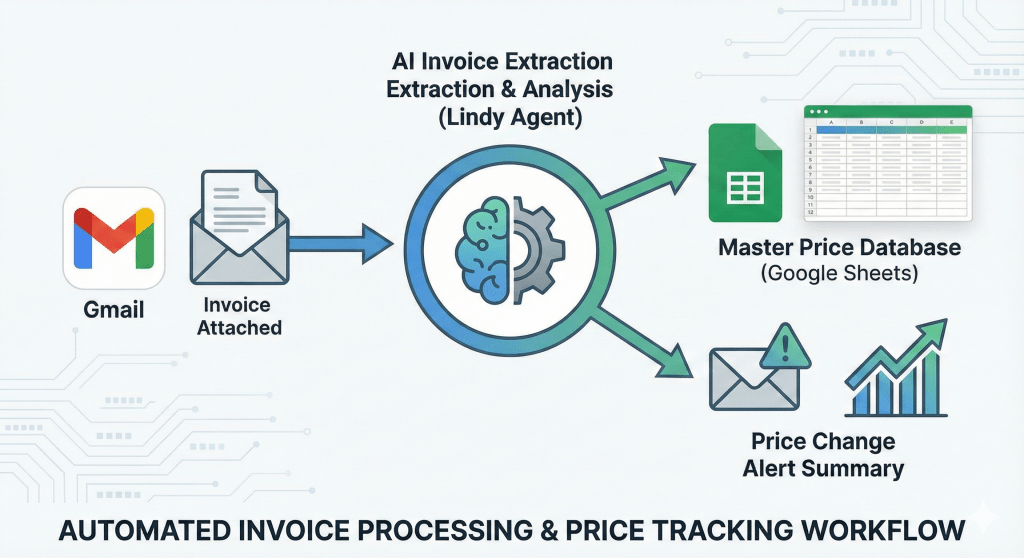
This AI now autonomously reads every invoice, extracts the unit price of every item, logs it to a master database, and sends us a daily summary flagging any price changes. This has drastically increased our visibility on market prices and increased our speed to bid.
Here is how you can build this exact agent yourself.
The Workflow: From Inbox to Insight
The goal is to create a seamless pipeline that requires zero human intervention. We are going to use Lindy to create an agent that connects Gmail and Google Sheets.
Here is the exact structure of the agent we built:
Step 1: The Trigger (Gmail)
The first step is setting up the “eyes” of the agent. You don’t want the AI reading every email—just the invoices.
- Action:
Gmail: On Email Received - Configuration: We set a specific filter so the agent only wakes up when it detects a supplier invoice. For this example, we configured it to trigger when the Subject contains “Western Nevada Supply Invoice”.
- Why this matters: This ensures the agent is focused and efficient, processing only the relevant financial documents.
Step 2: The Brain (AI “Write”)
This is where the magic happens. In the past, you would need complex OCR (Optical Character Recognition) software to read a PDF attachment. Now, we just use a simple Write action powered by a Large Language Model (LLM).
- Action:
Core: Write - The Prompt: We give the agent a natural language instruction. It looks something like this:”Review the invoice attached to this email. Extract the ‘Item Name’, ‘Unit Price’, and ‘Date’. Then, compare this Unit Price to the last recorded price for this item. If there is a discrepancy, note the difference.”
- The Result: The AI opens the attachment, understands the layout of the invoice (even if it changes), and pulls out the clean data we need.
Step 3: The Database (Google Sheets)
Once the data is extracted, it needs a home. We use Google Sheets as our “Master Price Database.”
- Action:
Google Sheets: Append Rows - Configuration: The agent takes the data extracted in Step 2 and automatically adds a new row to our specific tracking sheet (Spreadsheet ID:
1NtyD...). - The Output: A neat, organized historical record of every item purchased and what we paid for it, updated in real-time.
Step 4: The Analyst (The Summary Email)
This is the final piece of the puzzle that solves the “Price Creep” problem.
While not shown as a separate node in the screenshot (because we bundled the logic into the previous steps), the agent is instructed to perform a final check. After logging the data, if it detected a price change in Step 2, it sends a summary email back to the user.
The email might look like this:
“Heads up: The price for 1/2″ Copper Pipe has increased by $0.15 since the last invoice from Western Nevada Supply.”
The ROI: Why Build This?
Building this simple 3-step agent took us less than 20 minutes, but the payoff was immediate.
- Speed to Bid: We no longer have to guess if our material estimates are accurate. We have a live database of exact costs.
- Cost Control: Vendors make mistakes, and prices fluctuate. We now catch every single price increase the moment it happens, allowing us to renegotiate or adjust our own pricing instantly.
- Freedom: No one at L&L has to spend their Friday afternoon data-entering PDF invoices anymore.
Automation isn’t just about saving time; it’s about gaining clarity. By letting an AI agent handle the boring stuff, we gained a competitive edge in how we price our work.
Ready to automate your inbox?
Use this link to get $20 in free Lindy Credits!
Want to learn more about how AI can help you business? Here are some more articles or reach out today to schedule a consultation

 L&L Engineering

Leave a comment